
Phone Storage, RAM, and Processing Power: A Plain-English Reference
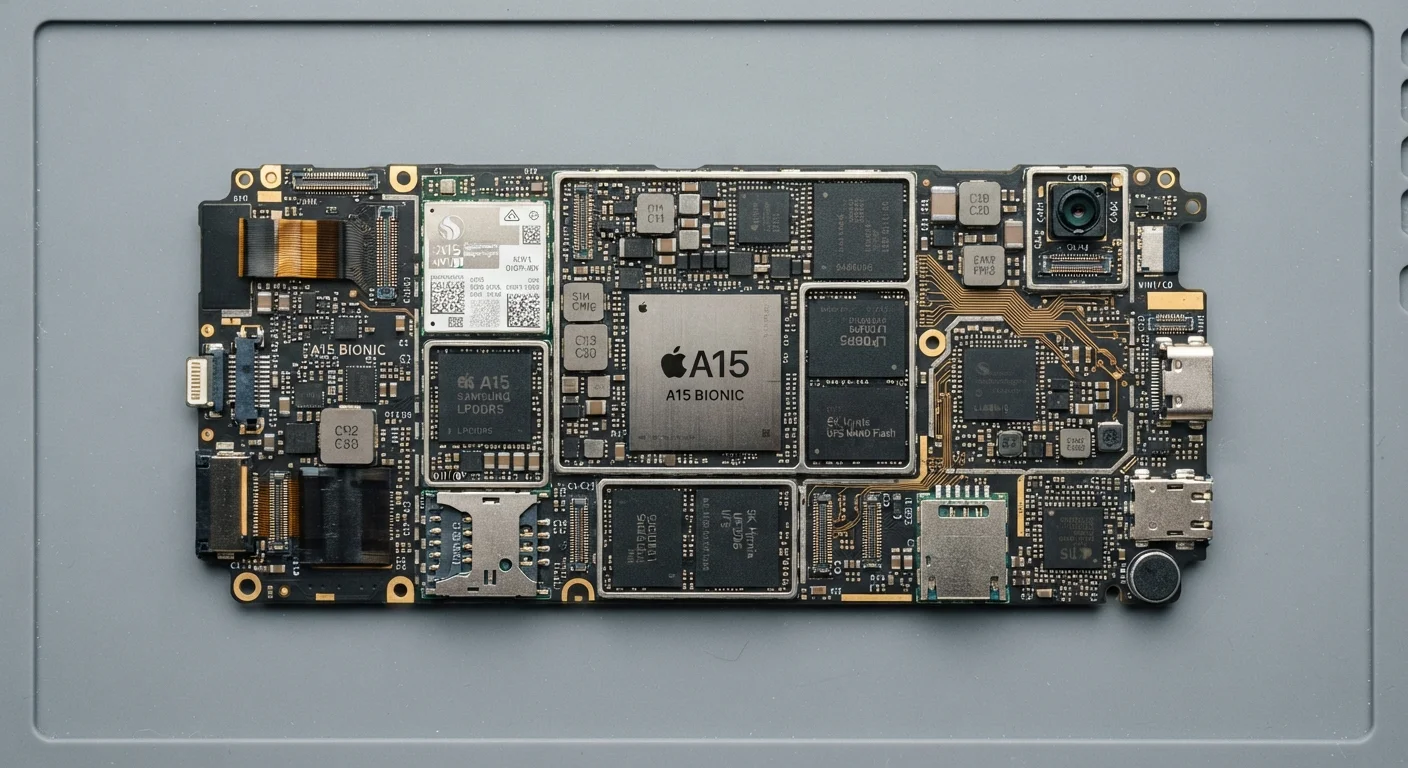
Photo credit: SearchLynk.net | Search Made Easier
In this article
A handy reference defining the core hardware terms you'll encounter when reading about any smartphone or tablet.
Why These Three Terms Keep Coming Up
Whenever a new phone is announced, three hardware concepts dominate the conversation: storage, RAM, and processing power. Marketers lean on them heavily, and reviewers treat them as shorthand for a device's capability. But for most readers, the specifics blur together quickly.
This reference breaks each concept down plainly - what it is, what it controls, and why it matters for the way you actually use a phone day to day. For a broader look at how these specs translate into real-world performance, see our guide to decoding smartphone specs.
Internal Storage
The permanent memory built into your phone that holds apps, photos, videos, and the operating system. Data here persists even when the phone is off.
RAM (Random Access Memory)
Fast, temporary memory your phone uses while actively running apps and tasks. It is cleared when the device restarts and determines how much the phone can hold in active use at once.
Processor (SoC)
The central chip that executes all computing instructions on your phone. It determines speed, multitasking ability, graphics performance, and often battery efficiency.
Clock Speed (GHz)
A measure of how many processing cycles a chip can complete per second. Higher GHz can indicate faster individual task execution, though overall performance depends on architecture too.
Core
An individual processing unit within a chip. Modern phone processors have multiple cores, allowing them to handle several tasks simultaneously.
Cache
A small, extremely fast memory layer built into the processor that stores frequently accessed data for near-instant retrieval, reducing how often the chip must query RAM.
Storage: Your Phone's Filing Cabinet
Storage - often labeled as internal storage or flash storage - is where your phone permanently keeps everything: apps, photos, videos, music, and the operating system itself. When a phone says it has 128 GB or 256 GB, that figure refers to this long-term storage space.
A key distinction: storage holds data even when the phone is powered off. Think of it as a filing cabinet. When you take a photo, it gets filed there. When you download an app, it lives there until you delete it.
| Common Storage Tiers | 64 GB, 128 GB, 256 GB, 512 GB, 1 TB |
| Typical RAM Range (Modern Phones) | 4 GB - 16 GB |
| OS Space Requirement | 10-20 GB of storage used by the operating system alone |
| Storage Type Used in Phones | NAND flash memory (non-volatile) |
| RAM Type Used in Phones | LPDDR (Low Power Double Data Rate) |
| Chip Process Node Trend | Newer chips use smaller nodes (e.g., 4nm, 3nm) for greater efficiency |
Running low on storage slows downloads, can prevent software updates from installing, and may cause apps to crash. Regularly clearing cached files or offloading unused apps are common ways to reclaim space without buying a new device. Our article on software updates vs. hardware upgrades explains when low storage is the real culprit behind a sluggish phone.
RAM: Your Phone's Work Surface
RAM (Random Access Memory) is temporary, fast-access memory that your phone uses while it's actively doing something. When you open a browser tab, load a game, or switch between apps, the phone loads relevant data into RAM so the processor can reach it instantly.
Unlike storage, RAM is wiped every time your device restarts. It's not a filing cabinet - it's a workbench. The more surface area the workbench has, the more tasks your phone can juggle simultaneously without having to reload everything from scratch.
In practical terms: more RAM generally means smoother multitasking and fewer app reloads when you switch between them. A phone with 4 GB of RAM may struggle with a dozen open browser tabs; one with 8 GB or 12 GB handles that load more comfortably. That said, the operating system's efficiency matters too - a well-optimized system on modest RAM can outperform a bloated one with more.
Processing Power: The Engine Under the Hood
The processor (also called a chip, SoC - System on a Chip - or CPU) is what actually executes every instruction your phone receives. Tapping an icon, rendering a video, running a navigation app in the background - the processor coordinates all of it.
Processor capability is described in several ways: the number of cores (more cores can handle more tasks in parallel), clock speed measured in gigahertz (GHz), and the chip's manufacturing generation (measured in nanometers - a smaller number typically indicates a newer, more efficient design).
A faster, more modern processor means quicker app launches, smoother video playback, more capable computational photography, and longer useful device life before the hardware feels outdated. It also affects battery efficiency; newer chip architectures typically do more work per unit of power consumed.
Tablets and phones share these same chip fundamentals, though tablets sometimes prioritize sustained performance for heavier tasks. See our comparison of tablets and laptops for how processing needs differ by form factor.
How They Work Together
Storage, RAM, and processing power are interdependent. A powerful processor paired with too little RAM can bottleneck on multitasking. Plenty of RAM on an aging processor won't rescue a phone that struggles with modern app demands. And even the best chip can't help if the phone's storage is so full the operating system can't manage temporary files.
Understanding these relationships helps you interpret spec sheets more critically rather than chasing the highest number in any single category. Screen performance is similarly layered - our overview of display features shows how hardware specs shape the everyday viewing experience in the same nuanced way.
128 GB
Most common baseline storage tier in mid-range phones
128 GB has become the standard entry point for mid-range and flagship smartphones across most major markets as of recent product generations.
~15-20 GB
Typical OS and system app footprint
Modern mobile operating systems and pre-installed apps commonly consume 15-20 GB of advertised storage before any user content is added.
This article is for general informational and educational purposes. Specific performance outcomes will vary depending on device model, operating system version, and individual usage patterns.

Author
Tech & Telecom Editorial Team
Tech & Telecom Editorial Team is the collective byline for our editorial team and contributor network. Articles published under this byline or an editorial pen name are researched, written, and reviewed according to our editorial standards for clarity, consistency, and independence before publication.
View all articles →