
Why Your Phone Battery Degrades-and What Slows It Down
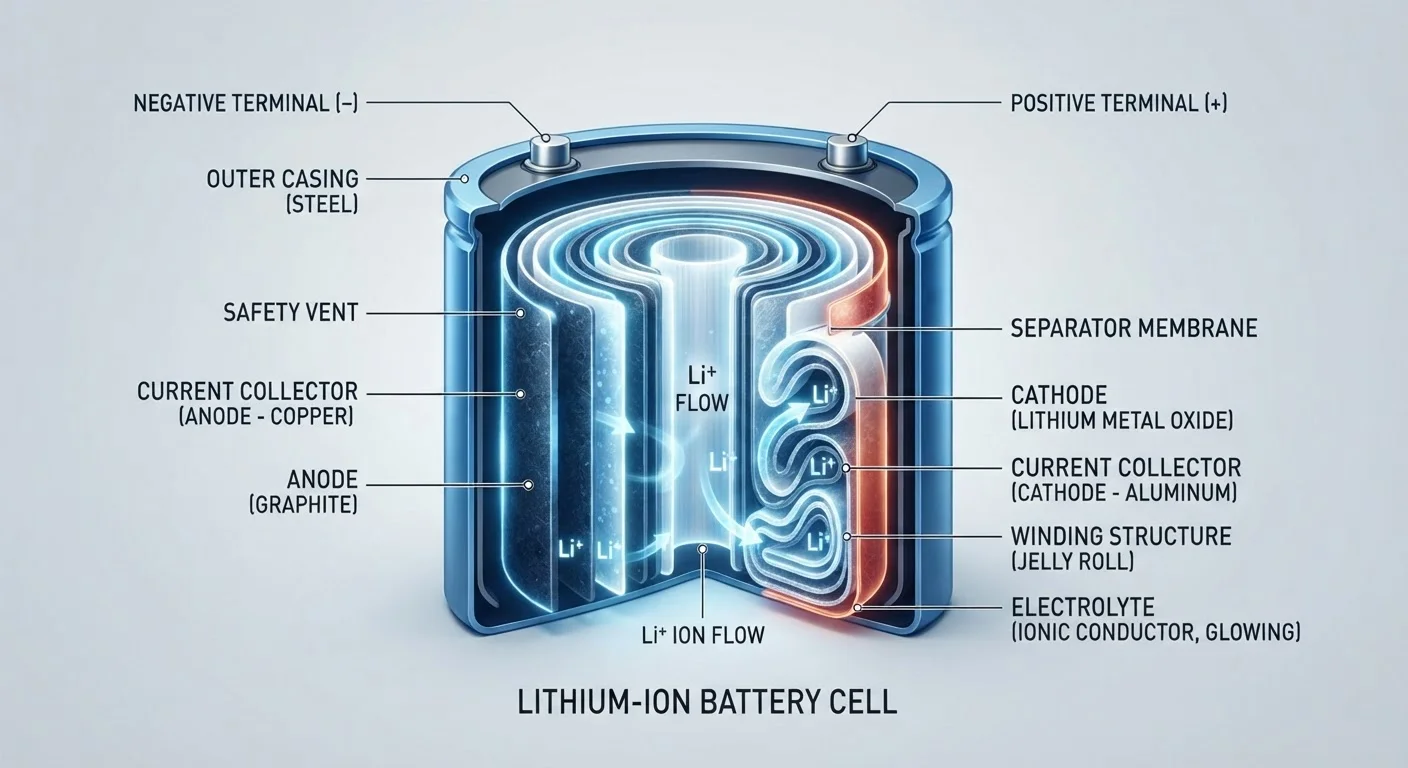
Photo credit: SearchLynk.net | Search Made Easier
In this article
Battery capacity naturally shrinks over time. Learn the science behind it and the habits that make a real difference.
Key Takeaways
- All lithium-ion batteries lose capacity over time - this is chemistry, not a defect.
- Heat is the single biggest accelerator of battery degradation.
- Keeping your phone between roughly 20% and 80% charge reduces stress on the battery.
- Fast charging is convenient but generates more heat, which speeds up wear.
- Many phones now include built-in features specifically designed to slow battery aging.
- Good charging habits can meaningfully extend how long your battery stays healthy.
The Chemistry Behind the Fade
Every smartphone battery is a lithium-ion cell, and its core job is to move lithium ions back and forth between two electrodes - an anode and a cathode - through a liquid or gel electrolyte. When you charge, ions travel one direction; when you discharge, they travel back. Energy is stored and released through this movement.
The problem is that this process isn't perfectly clean. Each cycle causes microscopic structural changes: electrodes expand and contract, the electrolyte breaks down slowly, and a resistive layer gradually forms on the anode. Over hundreds of cycles, these changes compound. The battery can no longer move as many ions as efficiently, so it holds less charge. This is degradation - and it's built into the chemistry itself, not a manufacturing flaw.
Battery capacity is typically measured as a percentage of its original design capacity. A phone that once lasted 14 hours on a charge might last 11 hours when its battery health reads 80%. Most manufacturers consider 80% the threshold where noticeable daily impact begins. For a deeper look at how hardware specs like battery capacity translate to real-world use, see our guide to smartphone specs.
~500
Typical full charge cycles before noticeable capacity loss
Most lithium-ion battery manufacturers rate their cells to retain around 80% capacity after approximately 300-500 full charge cycles under standard conditions.
80%
Capacity threshold where daily impact becomes noticeable
Apple and other manufacturers commonly cite 80% maximum capacity as the level at which battery health has meaningfully declined and replacement may be worth considering.
113°F
Temperature above which lithium-ion cells accelerate degradation
Battery University and other electrochemistry sources note that sustained exposure above roughly 113°F (45°C) significantly accelerates chemical breakdown in lithium-ion cells.
What Speeds Degradation Up
Heat is the dominant factor. Lithium-ion chemistry is sensitive to elevated temperatures - sustained heat accelerates electrolyte breakdown and electrode damage in ways that are largely irreversible. Leaving a phone in a hot car, running intensive tasks in direct sunlight, or consistently using a case that traps heat all take a meaningful toll over months and years.
Charge level extremes also matter. Holding a battery at or near 100% for extended periods creates chemical stress. The same is true at very low states - repeatedly draining to near 0% puts mechanical strain on the electrodes as they contract more aggressively. The electrochemically comfortable zone for long-term storage and day-to-day use is roughly 20% to 80%.
Charging speed plays a role too. Fast charging is convenient, but higher wattage generates more heat inside the cell. The battery doesn't have time to dissipate heat as efficiently during a 45-watt charge as it does during an overnight 15-watt top-up. This doesn't make fast charging dangerous - it's a calculated trade-off between speed and longevity.
Enable Optimized Charging on Your Phone
Both iPhone and many Android devices include a setting that prevents the battery from sitting at 100% for extended periods. On iPhone, go to Settings > Battery > Battery Health & Charging and enable Optimized Battery Charging. On Android, look for a similar option under Battery settings or Device Care - the exact label varies by manufacturer. Turning this on is one of the easiest, highest-impact steps you can take.
Habits and Features That Slow the Process
Understanding the causes points directly to the countermeasures. Keeping your phone out of high-heat environments is the highest-impact single change most users can make. A car parked in summer sun can reach internal temperatures well above what a battery handles well, even with the windows cracked.
On the charging side, many modern phones include an optimized charging mode - sometimes called Adaptive Charging or similar - that learns your routine and avoids holding the battery at 100% longer than necessary. Enabling this feature costs nothing and takes seconds to set up. Some phones also let users cap charging at 80% as a permanent setting.
Using a slower charger for overnight or non-urgent charging is another low-effort habit with real benefit. Reserve the fastest charger for when speed genuinely matters.
Removing a thick case during intensive tasks - gaming, video recording, navigation - can also help, as these activities generate significant processor heat that the battery absorbs. This is one of several habits covered in our article on extending smartphone longevity.
It's also worth questioning some older charging myths - ideas like fully draining before charging or avoiding overnight plugging-in reflect nickel-cadmium battery logic from decades ago, not modern lithium-ion reality. For a clearer picture, see our breakdown of common charging misconceptions.
When Degradation Becomes a Problem Worth Acting On
Some degree of capacity loss is simply part of owning a phone. The question is whether it disrupts daily life. A battery at 88% capacity is unlikely to be noticeable. One at 72% may mean you're reaching for a charger mid-afternoon when you didn't used to need one.
If your phone's battery health has declined significantly, replacement is an option - and often far less expensive than buying a new device. Many manufacturer service centers and third-party repair shops offer battery swaps. For phones where software performance has also declined alongside battery health, it's worth reading whether a software fix or hardware change is actually needed before deciding.
The broader takeaway: degradation is inevitable, but its speed is not fixed. Small, consistent habits make a measurable difference over the two, three, or four years you own a phone.
This article is for general informational purposes only. Device behavior varies by manufacturer, model, and software version. Consult your device manufacturer or a qualified repair professional for advice specific to your phone.
Frequently Asked Questions

Author
Tech & Telecom Editorial Team
Tech & Telecom Editorial Team is the collective byline for our editorial team and contributor network. Articles published under this byline or an editorial pen name are researched, written, and reviewed according to our editorial standards for clarity, consistency, and independence before publication.
View all articles →